Want to combine two decks into one during play, or put split piles back together? Deck Builder can merge another deck into the one you are viewing, folding all of its cards into your current draw pile. Here is how.
Merge a deck during a simulation
- Start a simulation with at least two decks: either a deck collection, or a single deck you have already split into pieces.
- Open the deck you want to merge into (the one that will keep all the cards).
- Tap the three-dot (⋮) menu in the top-right.
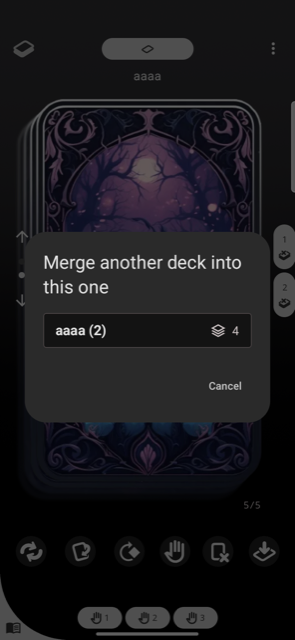
- Choose Merge another deck into this one.
- Pick the deck to merge from the list. Each option shows its card count, so you know how many cards you are about to fold in.
- Confirm. The chosen deck’s cards drop into your draw pile and its page is removed.
Merge is the inverse of split
Merge and split are two sides of the same tool. Split one deck into several piles to deal them out, then merge them back when you are done, all from the same three-dot menu during a simulation. Your deck structure is remembered when you reopen the session.
Requirements
You need at least two decks in the session (a collection, or a deck you have split), and the shuffle/merge with another deck option must be enabled in the deck’s settings.
