A card back is the face of a deck. Every physical card game knows this: the poker table’s blue diamond, the tarot deck’s starry night. Until now, Deck Builder decks either carried the standard back or needed a scanned or designed image of their own. Version 3.10.0 changes that with a gallery of twelve built-in card back designs, ready to apply in a few taps.
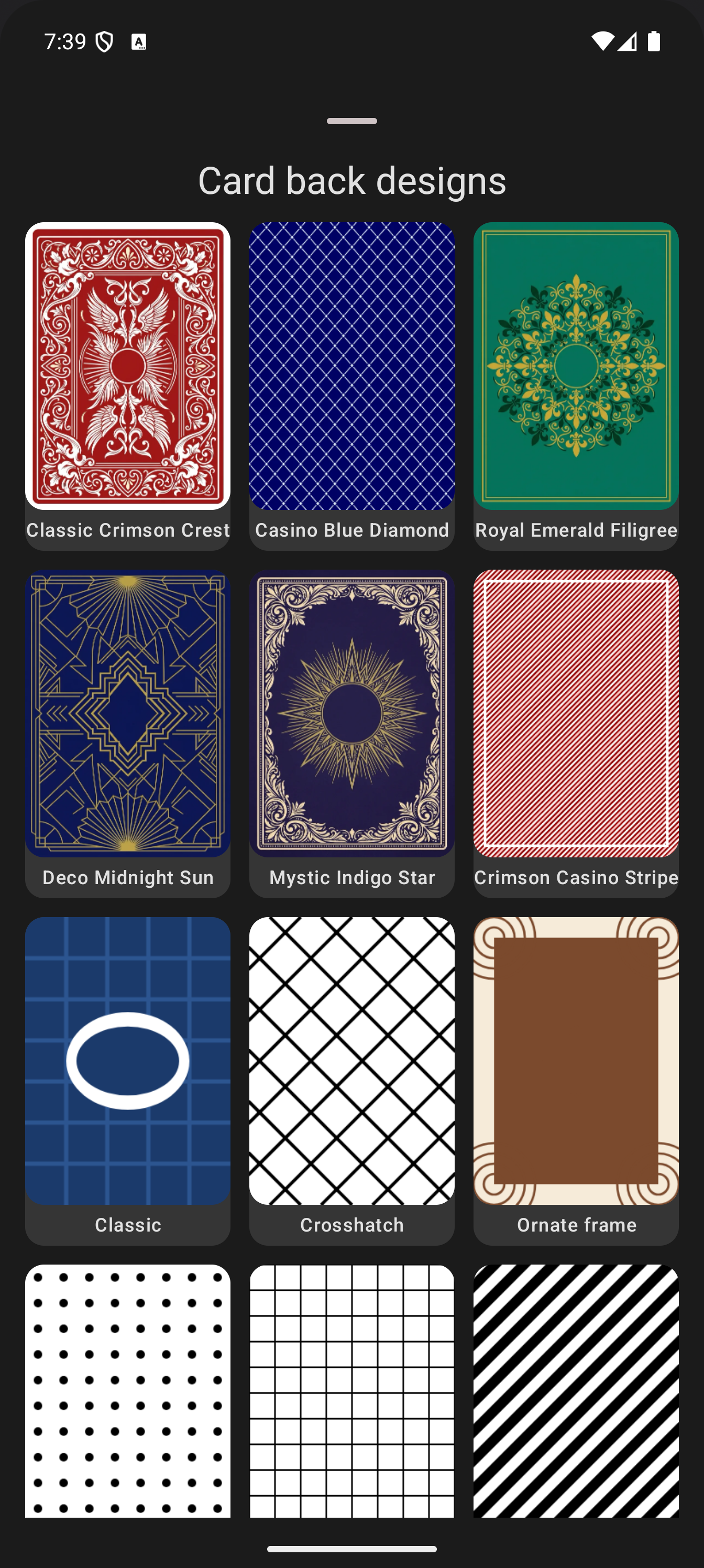
What is in the gallery
Twelve designs spanning the classic card table spectrum: Classic Crimson Crest (a deep red heraldic pattern), Casino Blue Diamond, Royal Emerald Filigree, Deco Midnight Sun, Mystic Indigo Star, Crimson Casino Stripe, plus the standard back, crosshatch, ornate frame and pattern designs. All of them are our own original artwork, so they work for any deck, published or private.
How to apply a card back design
- Open the deck and switch to the Details tab.
- Tap the pencil icon to edit the deck.
- Under Visual Assets, find Default Card Back and tap Change.
- Pick Choose a design.
- Tap a design in the gallery. The deck’s preview updates immediately.
That is the whole flow: no scanning, no design tool, no image files. The back applies to every card in the deck that does not define its own, and it carries through to the simulation, the draw pile and exports.
New decks get a back automatically
You do not even have to pick one: when you create a deck, it inherits a card back automatically, cycling through the design gallery so each new deck in your collection looks distinct. A deck with its own scanned or designed back keeps it; only decks without an explicit back participate in the round-robin.
Where the back shows up
- The deck’s cover in the deck list (when the deck has no cover art of its own)
- The simulation’s draw pile and face-down cards
- PDF print exports (backs print on the back sheet)
- The web app, with the same gallery and the same round-robin assignment
The same design system also powers collection card backs from 3.9.0: a collection can set a back for all its member decks, and per-deck designs take priority over it.
Try it with your own deck: open any deck, Details, Default Card Back, Change. If you do not have Deck Builder yet, it is free on Google Play, and you can follow the same flow in the web app. Questions or ideas for more designs? Join the Discord or support development on Patreon.
